Primitives as Objects
Last time we saw that Java had access to several primitive data types. One could argue that the presence of these primitives means that Java is technically not a pure object-oriented language. Fortunately, Java actually has objects for the primitives built in. This offers special functions that you can use when working with these data types.
Some examples are shown below:
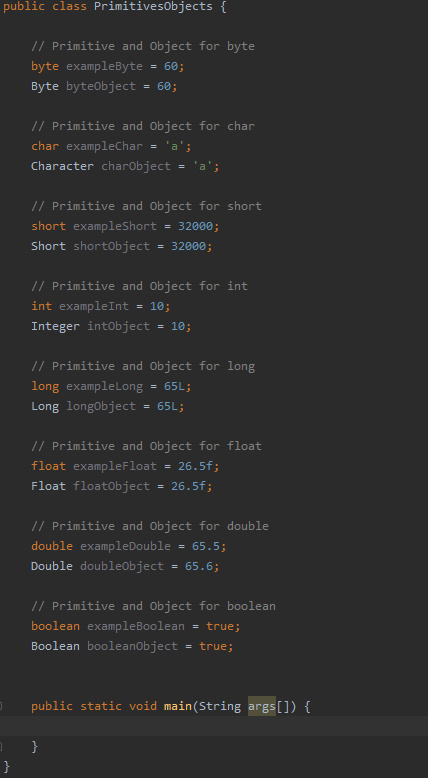
Note that they are being declared like objects and not like the primitives we saw last time:
The benefits of this are that these object will work with the abstract “Object” class in Java which means you can create a collection with various data types packaged together, but we’ll come to that later.
Strings
Strings are a vital part of any application. You can use them to store information, to write out sentences to the console or even to save data to a file. In Java, strings are objects which have many powerful functions, we’ll cover a few of these now.
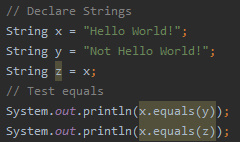
Comparing two strings for a match is done with the “.equals(OTHER_STRING)” but you can also use pattern matching in the form of regular expressions (RegEx). This kind of thing can be plugged in for the condition in a conditional statement we saw last time.
String splitting allows you to split a string into an array of strings using a given delimiter. This is particularly useful for reading in data from a file such as a “.csv” file, where all the attributes are separated by a comma.
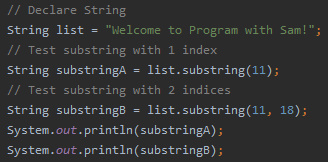
You can also get the substring of a string by treating the string as essentially and array of characters.
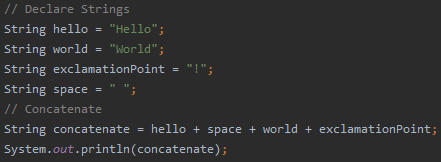
Java allows you to really easily concatenate strings, and this is exceptionally useful when building your applications.
ArrayLists
Arrays are a part of many programming languages, you’ll probably have come across them if you’ve done any C/C++. However arrays require you to specify a size in advance, and increasing that size after the array has been initialized can be quite cumbersome. Fortunately, Java has ArrayLists, which allow you to package groups of objects together.
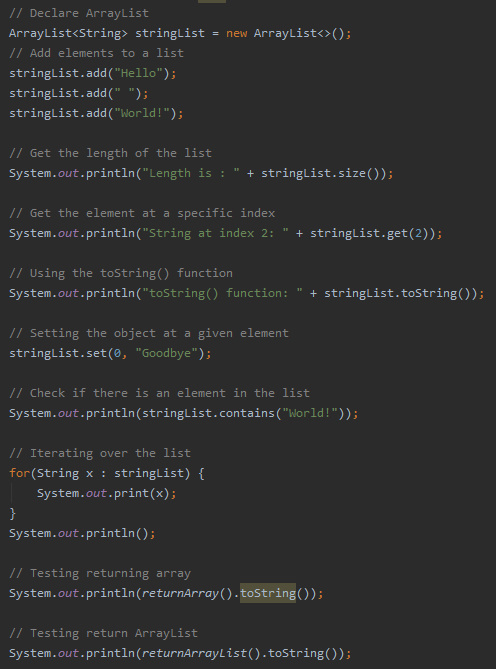
You can add, remove and set elements of an an ArrayList without having to modify the size of the list. Since ArrayLists are also objects, you can return them from a function, unlike arrays.
This is because when you return an array, you are actually returning the address that the array is stored at, which is not what you want necessarily.
As discussed last time, Java has a for each loop, which allows you to iterate over a collection of objects. This is particularly useful for searching for values in your ArrayLists.
Scanner Class
Lastly we’re going to cover some input/output classes that will come in handy when developing in Java. Firstly will start with input/output to the console.
We saw last time how to output to the console.
But how would be get user input in the console? This can be done using a Scanner object.
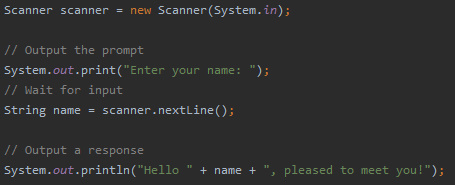
This allows us to collect the input from the console. Now you have a method of having the user interact with the applications you develop, you can begin to make some more advanced programs.
File Handling
It is also useful to be able to read/write data to and from the disk, this is where file handling comes in. There are many ways to implement file reading and writing in Java, a cursory glance at a Google search will tell you that. For the purposes of this tutorial we’ll be covering reading and writing to text files using buffered readers and buffered writers.
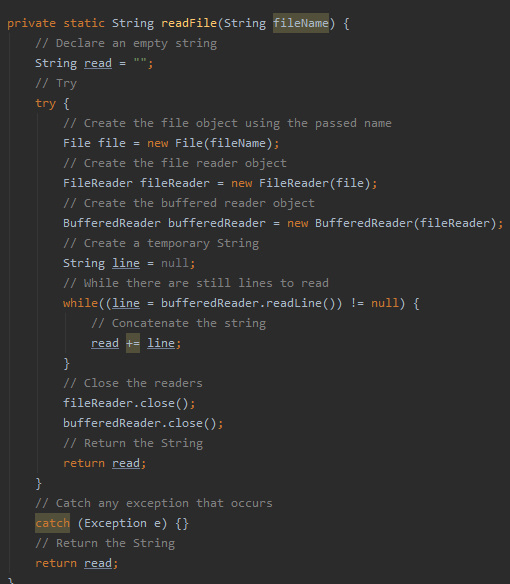
This function takes the filename of the file we want to read and returns the contents of the “.txt” file in the form of a String.
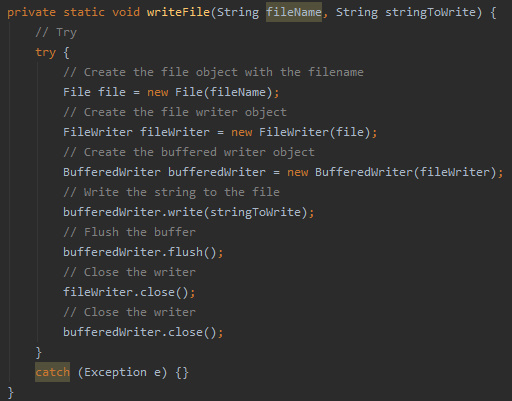
This function takes the filename of the file we want to write to and a String that we want to store and writes the string to the given file.
Next Time
Next time we will be looking at creating classes, introducing constructors and the garbage collector, demonstrating the access modifiers we discussed previously and getters and setters.

