Today we will be covering the creation of classes and then using them in combination with each other. Firstly, we’re going to want to create a package in the IDE. You can do this by right-clicking the “src” directory in the project exporer and selecting “new->package”.
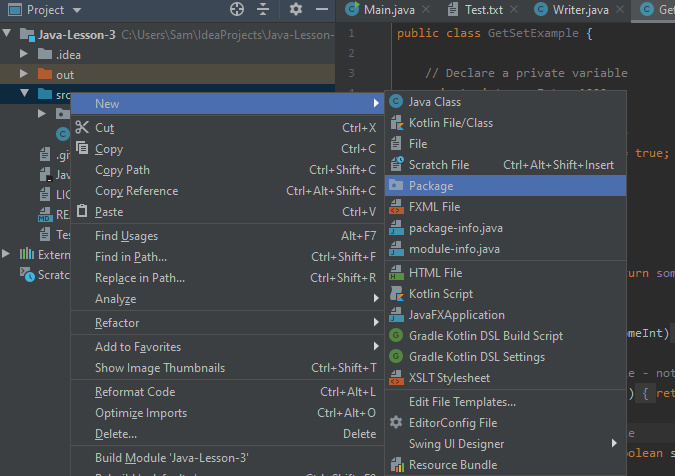
Once we have the package we will be ready to create some classes. For this tutorial we will make an application that allows users to enter a string, then counts the number of words in the string they entered and finally writes the string and the word count to the file.
We will start by creating the class to house the main function:
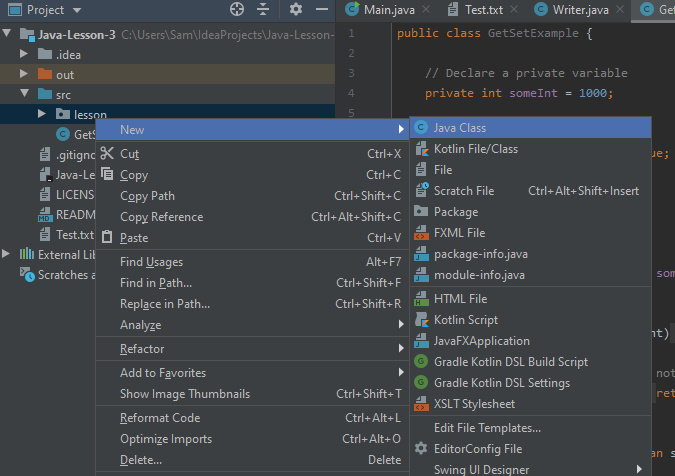
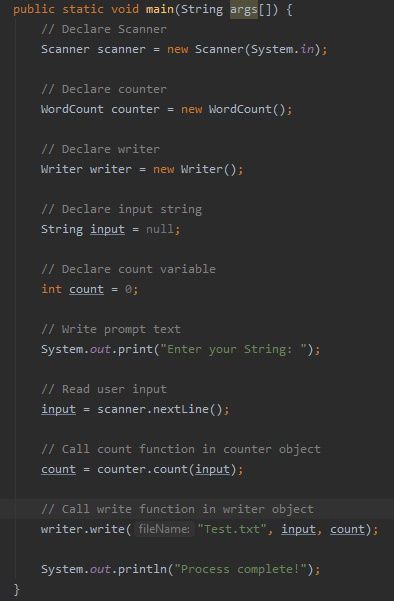
In this class we will put the main function that we’ve seen before and fill it with code to prompt users to enter a string in the console.
Now we need to create a class to handle the counting of the words in the string. To do this we create a class as before. We will then want to add a constructor for the class, this is the function that allows the class to be instantiated. Essentially, it is the function that is called when you say ” = new Object()”.
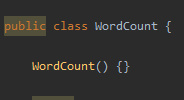
For this class we can leave it blank, but if your class has fields (variables) in, you may want to pass values to the constructor to initialise these fields.
Next we want to write a function that counts the number of words in the String. To do this we are going to use the “.split()” method available to strings. We discussed this last time and with our knowledge of arrays and ArrayLists we can now demonstrate splitting.
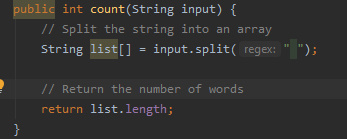
The above code works by splitting the string by the ” ” character, and storing each of the newly formed strings in an array. Since we are only counting words, there is no need to worry about punctuation.
We then simply return the length of the array – simple!
So now we have the word counting class, we just need the file writer class as we saw last time. By creating a new class and copying the function from last time in we are all set to finish our main function (see above). And that’s a simple application to get an input string and count the words and write the information to a file.
Garbage Collection
Before we end this weeks lesson, we are going to go over a couple more parts of Java. Firstly, we will look at the trash collector.
When running your applications, you’ll be declaring many variables and objects. In a language like C++ these will remain in memory until you specifically remove them. Fortunately for us, Java will automatically remove objects that are unreferenced in the executing code – which aids your memory use.
It is incredibly helpful, particularly if you’re new to programming. If you’d like to understand more about how the garbage collector works, there is plenty of helpful material available online.
Access Modifiers
Next we will discuss issues with access modifiers. As we saw in previous lessons, private functions and variables are inaccessible to from other classes. Whilst this can make your application more secure, it can be inconvenient if you want to access/modify a variable from a different class. The solution – getters and setters.
Getters and setters are a specific type of function with a singular purpose. A getter function will take the form “get[VARIABLE_NAME]()” and will simply return the variable.
A setter with take the form “set[VARIABLE_NAME](VAR_TYPE newVal)” and will set the chosen variable to the passed value.
Next time
Next time we will be looking at abstraction, creating abstract classes, inheritance and how to inherit from abstract classes and examining the uses of these two concepts in your applications.

