Now that we’re all set up and ready to do some actual coding. For this we’ll be doing the classic “Hello World!” example.
To begin with, create your project. You’ll notice that when you create the the project it will come with the “Hello World!” already created.
So lets walk through what is going on. Firstly, there is there is a library included “iostream”. This is the input/output stream library that allows for the input to, or output from the console.

Then if we go into the method body, we’ll see the “cout” function. This is the function that is outputting the string to the user. You could change the string in the statement to be anything you want.

It is important to note that we use the namespace “std” as seen here:

This allows us to use the raw “cout” as opposed to “std::cout”. From the “iostream” library, we also have access to the “cin” function, which allows us to take in user inputs. Let’s try that:
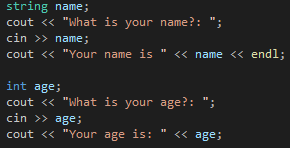
This application asks for a user input and returns what they said. With this you can read in any input from the user.
Next time
That will cover it for this time, next time we’ll explain variables and objects in C++, demonstrating comments and exploring the namespace issue a bit more.

