So when we’ve been talking about saving variables and states of applications thus far, we’ve been talking about using text files to write variable data out and read variable data in. In fact Java has a set of classes that are designed to allow you to save entire objects.
This process is called serialization and utilizes an interface known as serializable.

Serializable allows us to “serialize” our Java objects and then “de-serialize” objects when we read them in. This can be helpful for if we want to save the entire state of an application or object.
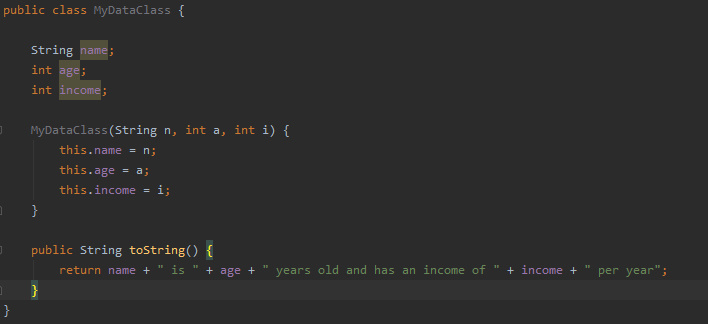
So how do we use it? Let’s start by creating a class that has fields and a toString method so that we can see the values of the fields at runtime. We’ll also need a constructor that takes some values so that the fields can be set.
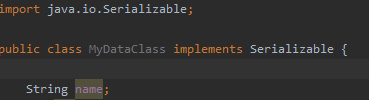
The next step will be to implement serializable, which we know how to do from the previous tutorial on interfaces.
We’re going to include a serialVersionUID. This is good practice as in Java, the runtime environment will have a version number associated with every serializable class. It’s then used in the deserialization process to ensure that the sender/reciever of the serialized object(s) have loaded the right classes for that object. Otherwise an InvaldClassException will be raised.
The serialVersionUID must be a long, and must also be static and final.
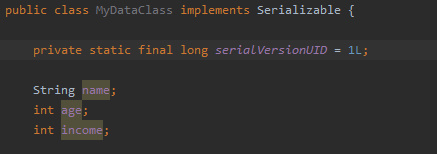
So now we have our class whose objects can be serialized and saved to a file. But we need a method of writing the objects as files and reading in these files.
We’ll make a new class called FileSerializer and in it we’ll put functions writeFile and readFile
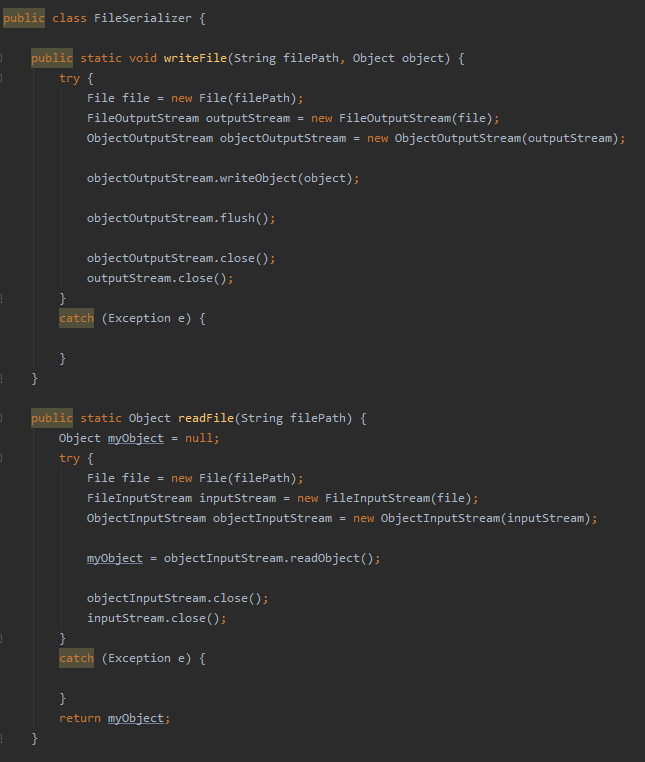
With those functions now defined, we can create a main class that creates and object, outputs the fields with toString, then saves said object and sets it to null. Then the function can load the object and prove it has been reloaded using the toString function again.
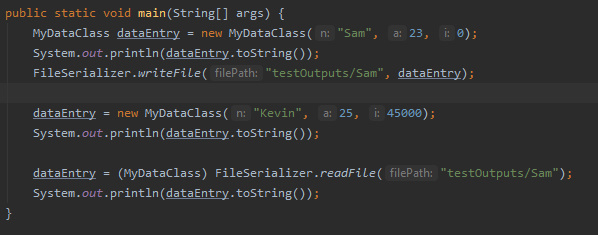

And that about wraps it up, you now have all the tools you need to have you applications save and load their objects.
Next time
Next time, we’ll be introducing JavaFX. We’ll be looking at how to download and install the appropriate libraries and applications to help you build basic interfaces for you applications. We’ll then see how to set up a bare-bones JavaFX application.

