Today we’re going to be making header files in C++. Visual Studio makes this very easy to do and in fact, if you’ve watch the C series, you’ll probably already now how to do this.
To start, in Visual Studio, we’ll want to create the header file:
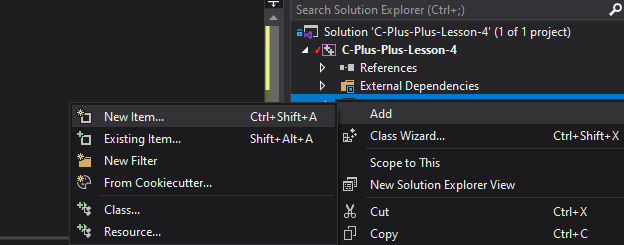
In here, we’re going to declare the functions, for this tutorial, we’ll do the mathematical functions again:
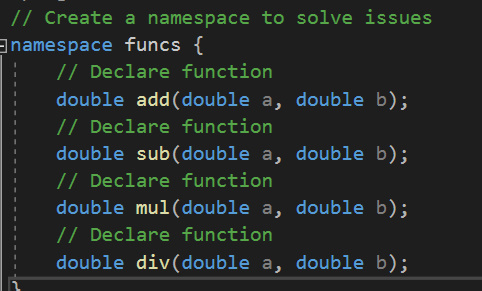
Now you can see that the functions have been declared, but there is no definition, no function body.
We need to define the function in a separate file, so we’ll need to create a .cpp file to go with the header, like so:
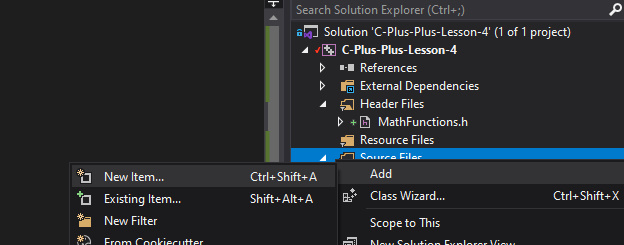
In this file, we can then write the actual method bodies for the declared functions:
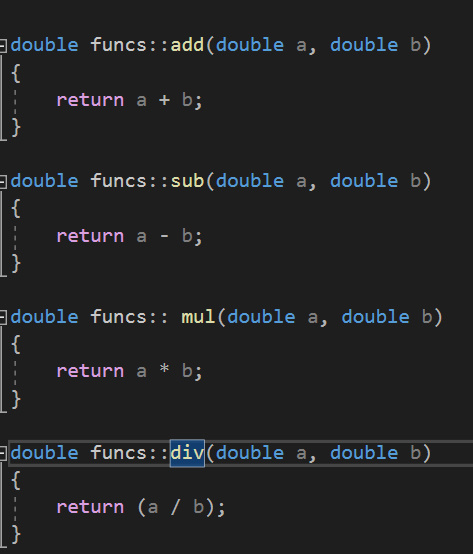
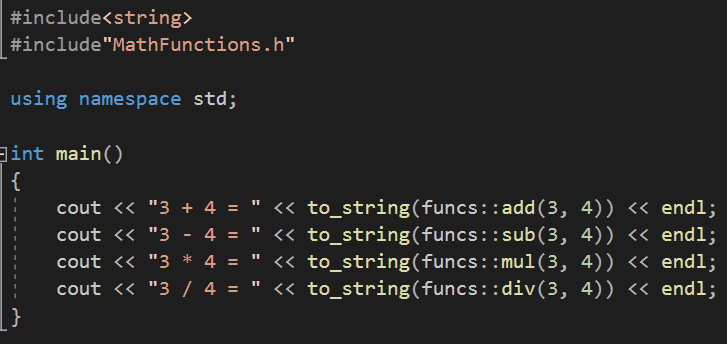
And that is the header file created, along with the corresponding source file. The last thing we need to do is include it in our code and test the functions:
Next time
That’s it for this time, next time we’re going to be having a look at loops and control statements in C++. We’ve already seen some of these in our previous tutorials, but C++ gives us access to more loop styles, including iterating through objects of a collection.

