Last time we looked at some data types we had available in Python as well as control structures, functions and overall indentation.
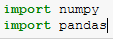
Today we’re going to be looking at NumPy and Pandas. We’ll need to start by importing them which we can do as so.
We can also abbreviate the name at import by doing the following:
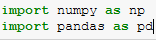
This means we can use are shorthand name for the package.
NumPy essentially offers us a robust array schema, with numerous functions available including calculating the mean, standard deviation and even the covariance matrix for a multi-dimensional array.
But first we’ll need to declare some NumPy arrays. Some examples of how to do this are shown below:
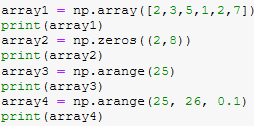
This then provides us with a robust way of storing our data for manipulation, however, maybe we want something more akin to a table when doing our data analysis.
This is where Pandas come in. Pandas let you create DataFram objects, which are essentially tables of columns and rows, with headers and the data stored within the table.
We can create Pandas like so:

We can access data entries using “iloc” but there are other functions available.
These two objects can be converted from one to the other which makes it incredibly easy to do machine learning and data analytics.
That’ll cover it for this time!
Next time
Next time, we’ll be creating classes, instantiating those objects in our applications and duck typing!

